PhaseArrayVis
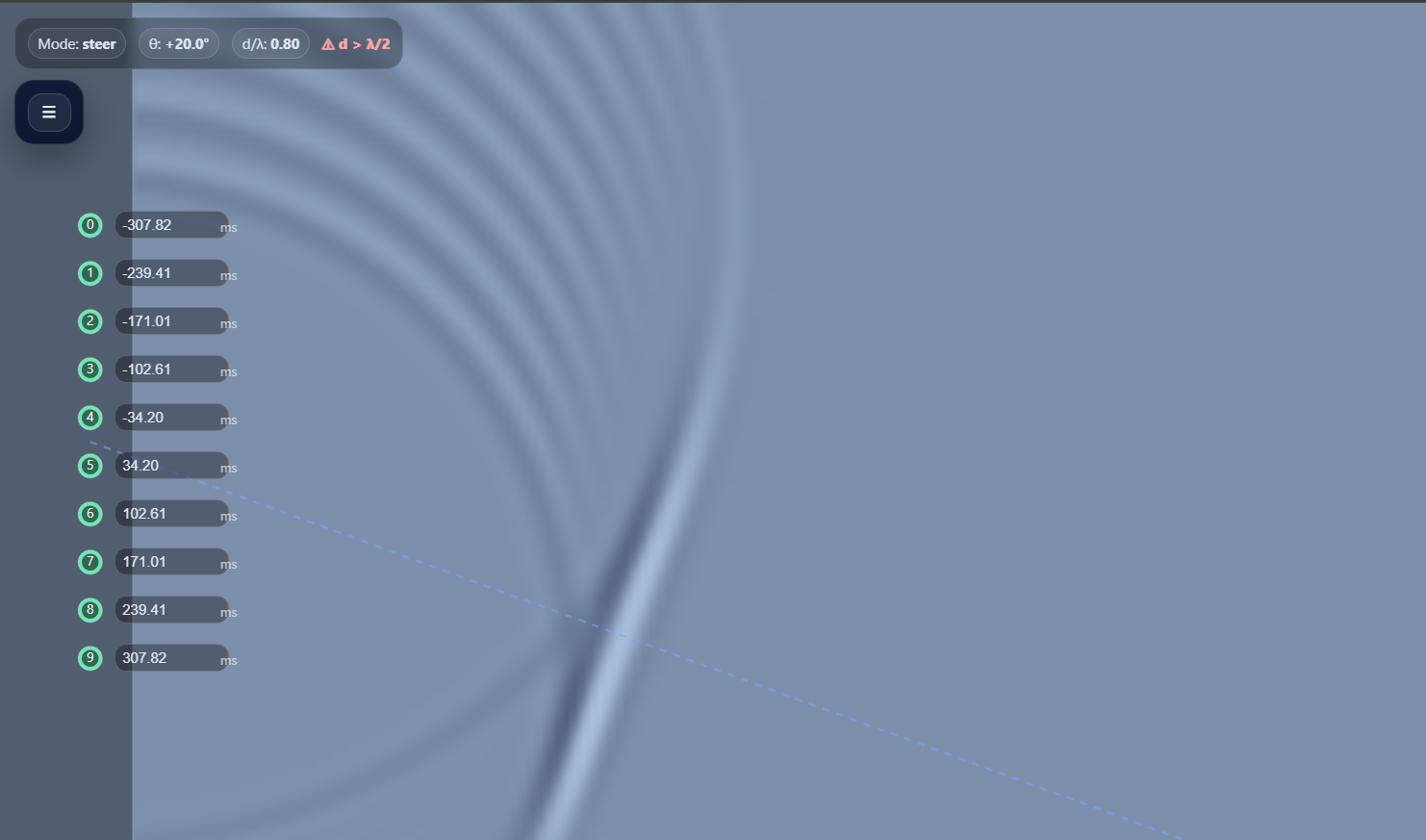
Interactive phased-array visualization, steer beams, explore wave dynamics
PhaseArrayVis: Interactive Phased-Array Antenna Simulation and Beam Steering
Introduction:
PhaseArrayVis is an interactive web-based tool designed to visualize and simulate phased-array antennas. The app allows users to explore the concepts of beam steering, pulse transmission, and wave propagation, all within a user-friendly interface. The tool provides a hands-on approach to understanding how phased-array antennas direct signals by adjusting the time delay between individual array elements. Whether you are an engineering student, educator, or just curious about antenna technology, PhaseArrayVis offers an intuitive platform to experiment with real-world concepts of beamforming.
Phased-Array Antennas: Basic Concepts
Phased-array antennas are a type of antenna system that utilizes multiple individual elements (or antenna units) to form a larger, more powerful array. These antennas can transmit and receive electromagnetic waves in a controlled, directional manner by adjusting the phase (timing) of the signals sent or received by each element. The key advantage of phased-arrays is their ability to dynamically steer the beam of energy without physically moving the antenna.
In a typical phased-array system:
Each element in the array emits an electromagnetic wave.
By varying the time delay between the waves from different elements, the interference patterns change, and the resulting wavefront becomes focused in a particular direction.
The array can be "steered" by changing these delays, allowing the beam to be dynamically aimed at different targets.
How PhaseArrayVis Works
PhaseArrayVis simulates the behavior of phased-array antennas by visually demonstrating how changing the delay between each array element influences the propagation of the transmitted wave. The app displays the array elements (typically ten in this simulation) as vertical rods arranged on the left side of the screen, and users can interact with them to control the system's behavior.
Key Features of PhaseArrayVis:
Antenna Array Control:
The array consists of ten elements, each represented as vertical lines.
Users can click on any antenna to fire a pulse, or they can fire the entire array in a synchronized manner (synchronous fire) or with custom delays (beam steering).
The delay for each antenna element can be set manually in the input fields next to each antenna, allowing users to experiment with different configurations of beam steering.
Interactive Beam Steering:
The app lets users adjust the beam direction by changing the delay values for each antenna element. These delays are displayed as time in milliseconds (ms).
By increasing or decreasing the delay for each element, the user can see how the wavefront shifts direction, simulating how a phased-array antenna can point its beam without moving physically.
The time delay controls allow for precise manipulation of the beam, making it easy to explore the physics of beamforming.
Wave Propagation Visualization:
When the user fires the array, the app visually simulates the propagation of the electromagnetic wave as concentric rings. These rings represent the wavefronts of the transmitted signal, and their movement shows how the wave spreads out over time.
The wavefronts change depending on the phase differences between the antenna elements. If the delays are set symmetrically (no steering), the wavefronts are uniform. If delays are introduced, the wavefronts tilt in the direction of the steering, visually demonstrating the concept of beamforming.
Control Panel with Customization Options:
The control panel provides various sliders and input boxes for adjusting parameters like the wave speed, wavelength, antenna spacing, and pulse cycles. These settings allow users to experiment with different factors that influence the wave propagation.
Additionally, users can adjust the rendering quality for finer visual details, making the app adaptable to different performance needs and teaching environments.