PID Demo
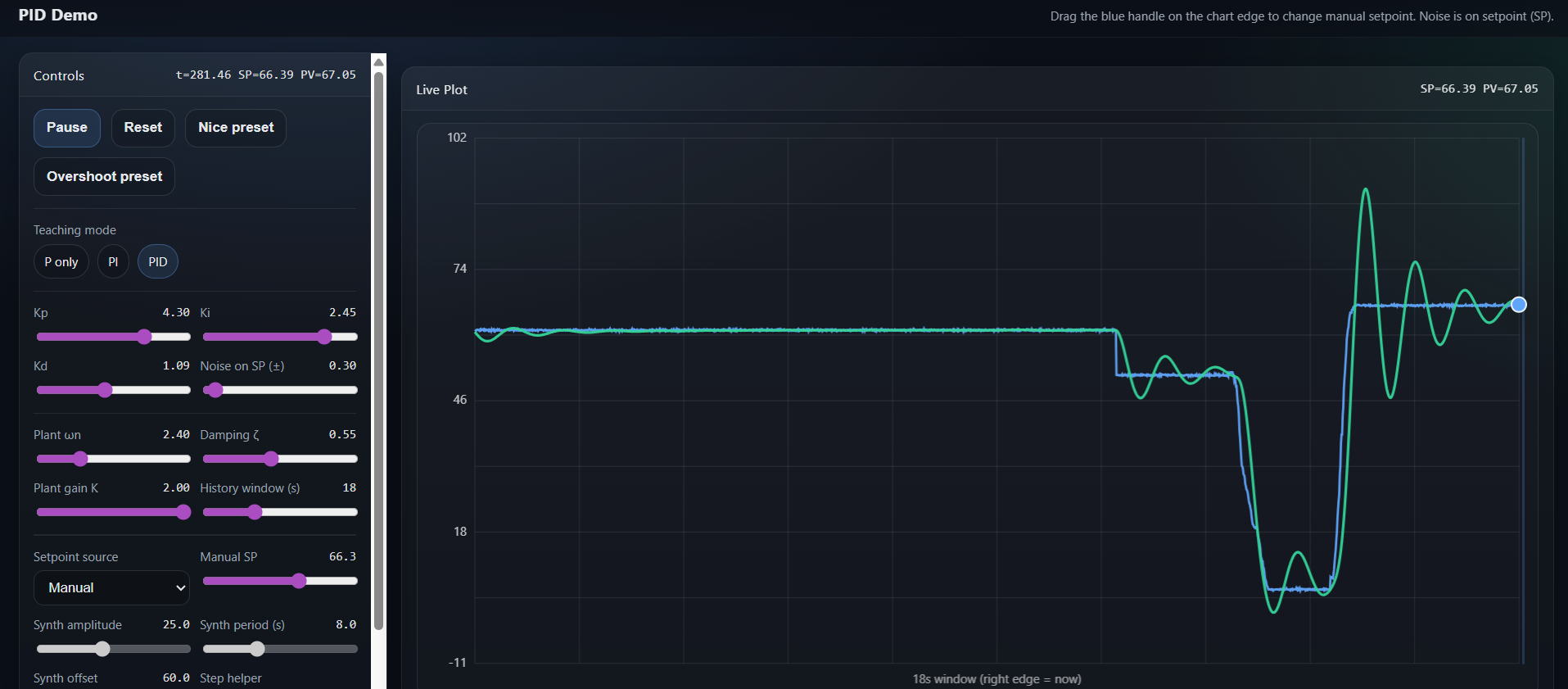
Interactive PID controller demo with live plot
This is a front-end-only PID controller demo designed for learning by experimenting. It runs as a single HTML file (no backend, no dependencies) and focuses on a clean, “two-line” visualization: the Setpoint (SP) and the Process Value (PV). The goal is to make PID behavior feel intuitive—especially what P, I, and D change—without turning the UI into a complicated industrial simulator.
What you’ll see
On the right, a live chart shows two signals over time:
Setpoint (SP) (blue): the target value you want the process to follow.
Process Value (PV) (green): the actual output of the simulated system.
The chart stays fixed while you scroll the controls, so the plot is always visible. A draggable handle is attached to the setpoint level at the right edge of the plot—so changing SP feels direct and natural.
How the simulation works (high level)
Under the hood, the “process” is simulated as a second-order plant (think mass-spring-damper behavior). That matters because second-order systems can naturally overshoot and oscillate when they’re underdamped. So when you see overshoot, it isn’t “faked” for the animation—it comes from the system dynamics plus your chosen PID gains.
The controller is a standard PID:
P responds to the current error (SP − PV).
I integrates error over time (removes steady-state offset).
D adds damping by responding to how fast the process output is changing.
To keep the demo simple and aligned with a “signal-flow” mindset, noise is applied to the setpoint (not the measurement). That means “noise” here represents a noisy target/reference or a noisy synthesized command signal. This is a good way to study tracking limits and controller aggressiveness without introducing separate measurement channels and extra plots.
Two ways to drive the setpoint
This demo intentionally keeps the setpoint source simple:
Manual setpoint
Use the setpoint slider in the control panel, or drag the setpoint handle directly on the chart.
Best for classic “step response” learning.
Synth setpoint
Generates a repeating square-wave setpoint (with amplitude, offset, and period controls).
Great for seeing repeated transitions and how tuning changes overshoot, settling, and tracking.
Noise can be added in both modes, since it’s applied to the setpoint signal.
How to learn each PID term (recommended)
If you want to clearly see what each term does, follow this recipe:
Turn Noise to 0
Noise is useful later, but it can hide the clean patterns while you’re learning.
Use Manual mode + “Step”
Click “Step” to switch between two setpoint levels.
This gives you the same repeatable test each time.
Try one term at a time
Use the built-in teaching modes:
P only
You’ll typically see faster response as Kp increases.
Too much Kp can cause overshoot or oscillation.
Often leaves a steady-state error (PV settles below SP).
PI
Integral action removes steady-state error.
Too much Ki can cause slow oscillation (“hunting”) or sluggish settling.
PID
Derivative helps reduce overshoot and speeds up settling.
In real life, D is very sensitive to measurement noise; in this demo, noise is on SP for simplicity.
Plant controls (the “feel” of the system)
The plant settings shape how the simulated process behaves:
ωn (natural frequency): how fast the plant can move.
ζ (damping ratio): how “ringy” it is (lower ζ → more overshoot).
K (plant gain): how strongly control output affects PV.
If you want dramatic overshoot, use a lower damping ζ (for example 0.2–0.5) and then increase Kp or change the step size.
Quick troubleshooting tips
“I don’t see much change when I move gains.”
Turn noise off, use Manual + Step, and adjust only one gain at a time. Also try lowering ζ.
“It looks too wild / unstable.”
Reduce Kp and Ki, increase ζ, or increase Kd slightly. Reset and test again.
“Why doesn’t D explode with noise?”
Because the demo’s noise is on the setpoint, not on the measured PV. That’s intentional to keep the model simple.
Who this is for
This demo is ideal for:
Students learning PID tuning basics
Makers and hobbyists building intuition
Anyone who wants a simple, beautiful, interactive visualization
It’s not trying to be a full industrial simulator. Instead, it’s a focused learning tool: two lines, clear interactions, instant feedback.