PDF Snipper
Offline PDF viewer and snipping tool with High Resolution
PDF Snipper is a lightweight, front-end-only tool for viewing PDF files and extracting crisp, high-quality image snippets—especially useful for technical drawings, scanned plans, and CAD-to-PDF exports. It runs entirely in your browser, requires no backend server, and can be configured to work fully offline. If you deal with PDFs that contain vector linework, dense annotations, or fine geometry, PDF Snipper is designed to help you zoom in, rotate, and capture exactly what you need without losing detail.
At its core, PDF Snipper provides a clean PDF viewing workspace with the controls you actually use: page navigation, fine-grained zoom, and rotation. Pages can be switched with buttons or keyboard shortcuts, making it easy to move quickly through multi-page documents. The zoom range goes down to 1% and up to 800%, letting you get an overview of large sheets or zoom deep into small features like dimension text, symbols, or hatch patterns. Rotation tools are built in for handling drawings that arrive sideways or upside down, so you can orient a page correctly before selecting a snippet.
For precision work, the interface includes a “hairpin” crosshair overlay that tracks the mouse position directly on top of the PDF content. As you move the cursor, horizontal and vertical guide lines intersect at the pointer location, and the current coordinates are displayed in the top bar. This is particularly handy when you’re inspecting layouts or trying to reference consistent positions on a page. Whether you’re reviewing a mechanical drawing, an architectural plan, or a plot export, the crosshair gives you a stable visual reference for alignment and small details.
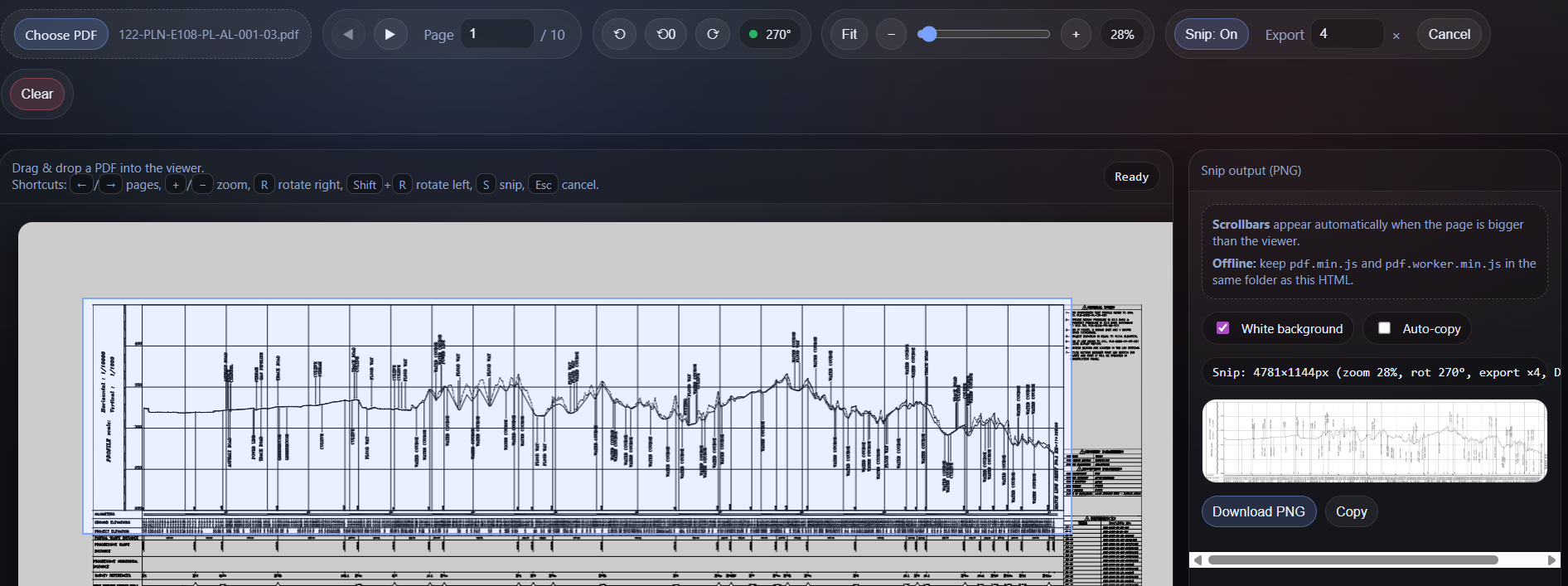
The snipping workflow is straightforward: toggle Snip mode on, then click-and-drag to draw a rectangular selection over the area you want. When you release the mouse, the selection is exported as a PNG image. Instead of simply cropping your on-screen view (which can be limited by the current zoom level), PDF Snipper re-renders the underlying PDF page at a higher internal scale before extracting the selected region. This “export multiplier” approach preserves sharp edges and legible text, which is exactly what you want for CAD-derived vector PDFs and engineering documents. You can increase or decrease the export multiplier depending on the level of detail you need and the memory limits of your browser.
Output options are practical and modern. The exported snippet appears in a preview panel, where you can download it as a PNG file, and—if your browser supports it—copy it directly to the clipboard for quick pasting into reports, emails, documentation, or chat tools. There’s also an optional “white background” setting that fills the output behind transparent PDF content, which can be especially helpful for technical drawings that use thin colored lines or transparency. The result is a snippet that looks consistent across different apps and backgrounds.
PDF Snipper is built with offline use in mind. By default it can use a local copy of the PDF rendering engine (PDF.js) so it runs without an internet connection. This is ideal for secure environments, field work, or situations where you’re handling sensitive drawings and don’t want any network dependency. Because everything runs locally in the browser, your PDF files never leave your machine. You simply open the HTML file, load a PDF from disk, and work as usual. For maximum compatibility, the tool can also automatically adjust worker usage when opened directly from a file path, allowing it to function reliably even when browsers restrict certain features under file://.
The interface is designed to stay out of your way while still being comfortable for long sessions. The viewer area supports scrollbars automatically when the rendered page is larger than the viewport, so you can pan around by scrolling naturally as you zoom in. The layout separates the document workspace from the output preview, so you can iterate: zoom, rotate, snip, check the result, and repeat. Keyboard shortcuts accelerate common tasks and reduce repetitive clicking, making the tool feel responsive even on large PDFs.
Whether you’re capturing a section of a wiring diagram, a detail callout from an architectural sheet, a snippet of a plot, or a labeled region of a mechanical assembly, PDF Snipper helps you extract exactly what you need—cleanly and at high quality—without installing heavy software or relying on online services. It’s a small, fast utility that turns any PDF into something you can quickly reference, share, and embed wherever you work.