OrbitSim
Explore orbits, speed, altitude, and space phenomena interactively
OrbitSim: Your Interactive Space Exploration and Orbital Mechanics Simulation Tool
OrbitSim is an engaging, interactive educational tool designed to provide a deeper understanding of orbital mechanics and space phenomena. Whether you're a space enthusiast, a student learning about physics, or just curious about how satellites orbit Earth, OrbitSim offers a hands-on experience that simplifies complex concepts and lets you visualize them in a user-friendly way.
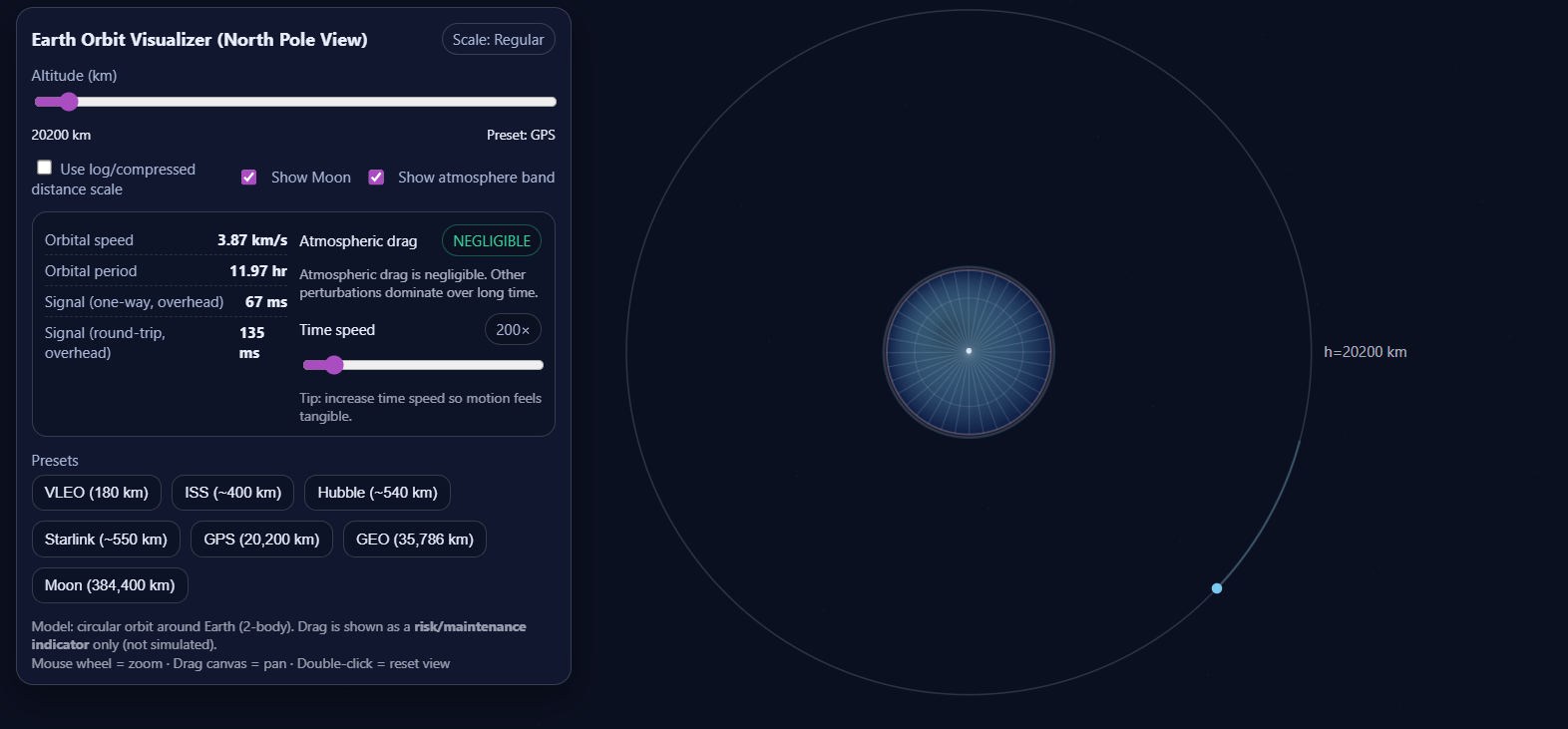
In this simulation, you control the altitude of a satellite orbiting Earth and observe how its speed, orbital period, and communication delays change with altitude. By adjusting a single slider for altitude, users can explore how orbital speed and period are interrelated, based on fundamental physics laws. OrbitSim helps make abstract orbital mechanics tangible, intuitive, and fun to learn.
Key Features of OrbitSim
Interactive Altitude Slider:
The core feature of OrbitSim is the altitude slider, which allows users to manipulate the orbital altitude of a satellite. From low Earth orbit (LEO) to geostationary orbit (GEO), users can explore how altitude directly influences orbital speed, communication delay, and orbital period.
Scale Toggle (Logarithmic vs. Regular):
OrbitSim offers a toggle that allows users to switch between regular scale and logarithmic scale for viewing the orbital path. This allows for better visualization, especially when zooming out to view larger orbits like GEO or the Moon’s orbit. The log scale compresses the higher altitudes, making it easier to visualize the vast differences between lower and higher altitudes.
Visualizing Orbital Mechanics:
The app provides a clear and engaging visualization of Earth, the satellite’s orbit, and the path the satellite takes around the planet. It uses a north-pole view of Earth to simplify the visual understanding of orbits, showing the curvature of Earth and how the satellite moves in relation to it. The satellite’s movement is calculated using basic orbital mechanics, which are based on Newton’s law of gravitation.
Satellite Speed & Period Calculations:
As you adjust the altitude slider, OrbitSim calculates the satellite's orbital speed and orbital period in real time. The satellite’s speed decreases as its altitude increases. For example, satellites in low Earth orbit move much faster than those in higher orbits. The app also calculates the time it takes for the satellite to complete one full orbit (orbital period), with a clear readout on the interface.
Real-Time Communication Delay (based on Light-Speed):
A unique feature of OrbitSim is the signal travel time calculation. For any given orbit, the app computes the one-way communication delay based on the satellite’s altitude. The communication delay is calculated using the speed of light (300,000 km/s), which determines how long it takes for a signal to travel from Earth to the satellite and vice versa. For low Earth orbit (LEO) satellites, the delay is measured in milliseconds, whereas for geostationary satellites (GEO), the delay can be much higher, reflecting the greater distance between the satellite and Earth.
Atmospheric Drag Indicator:
Another key feature of OrbitSim is the atmospheric drag indicator. This feature displays how atmospheric drag changes with altitude and how it affects satellite orbits. For satellites in lower orbits, drag is significant and can reduce their orbital lifetime unless reboosted. OrbitSim shows a color-coded drag indicator that helps users understand whether a satellite is in a safe orbital zone or whether it requires frequent adjustments to its orbit to prevent rapid decay.
Preset Orbits (Famous Satellites & Orbits):
To make exploration easier and more engaging, OrbitSim offers preset orbits that allow users to instantly view famous satellites and their orbits. Some of the presets include:
International Space Station (ISS): Located at around 400 km, the ISS is a prime example of a low Earth orbit (LEO) satellite.
Hubble Space Telescope: Orbiting at approximately 540 km, this satellite is another example of a LEO satellite with a similar operational altitude to the ISS.
Starlink: A satellite constellation that operates at altitudes around 550 km.
GPS Satellites: These satellites orbit at about 20,200 km, which is significantly higher than LEO satellites.
Geostationary Orbit (GEO): Located at 35,786 km, satellites in this orbit remain fixed relative to a point on Earth’s surface.
The Moon’s Orbit: As a distant context, users can also view the Moon’s orbit around Earth at an average distance of about 384,400 km.
Zoom and Pan Functionality:
OrbitSim includes zoom and pan functionality for exploring different orbital altitudes and visualizing the system from different angles. Users can zoom in and out to focus on specific orbits, such as LEO or GEO, and even zoom out to view the Earth and Moon together. The ability to pan and reset the view makes it easy to explore the system dynamically.